Why Maximum Hashrate Is Rarely Maximum Net Profit
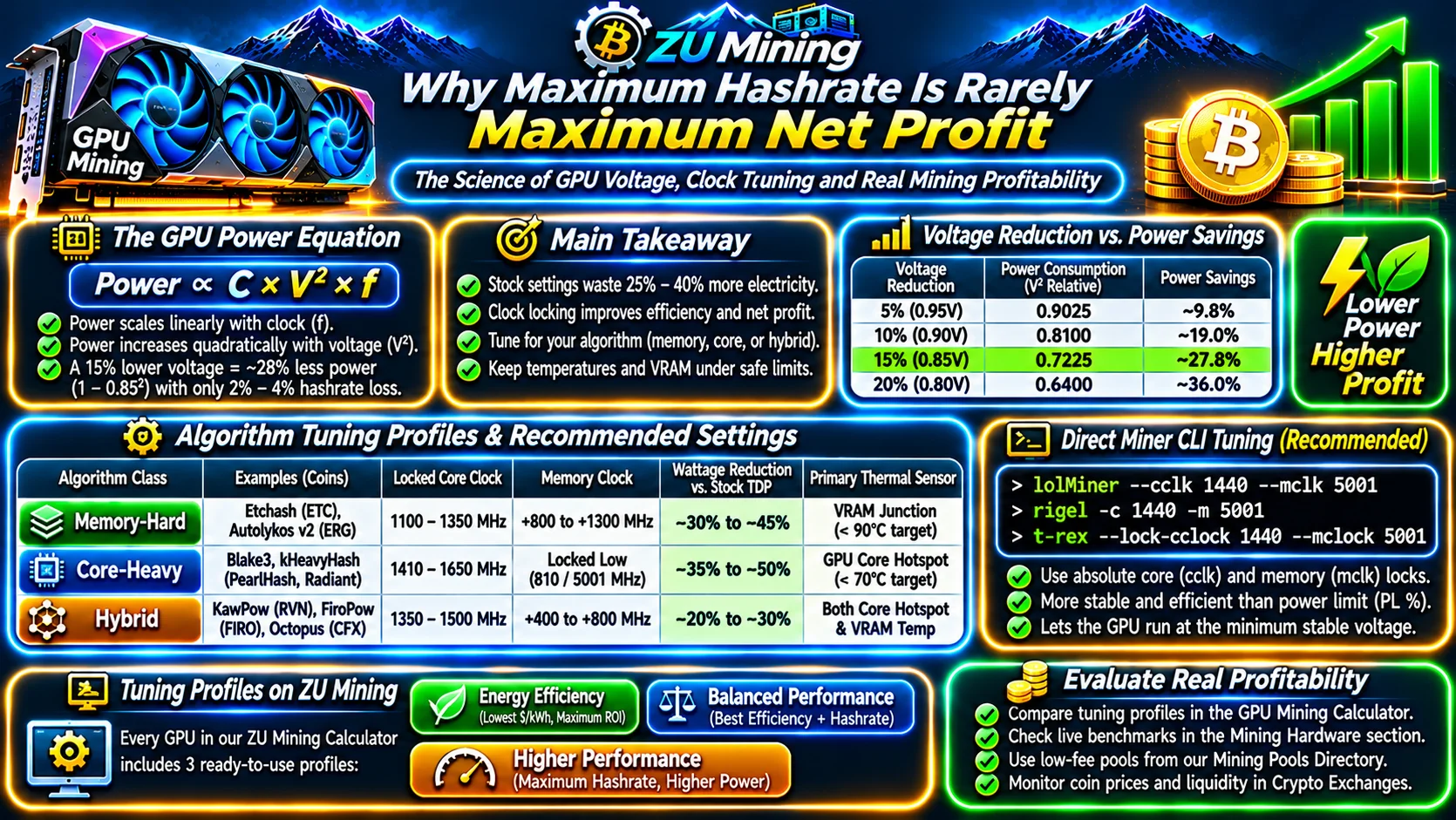
Every modern CMOS processor and graphics card obeys the dynamic silicon power equation: dynamic power consumption scales linearly with clock frequency (f) but quadratically with core voltage (V2):
Dynamic Silicon Power (Watts) ∝ Capacitance (C) × Voltage2 (V2) × Frequency (f)
Out of the box, gaming GPUs boost core voltages aggressively to squeeze out the final 5% of frame rate. In 24/7 Proof-of-Work mining, running a card at stock factory settings wastes 25%–40% more electricity and degrades thermal pads prematurely. By locking the GPU core clock to its sweet-spot frequency on the voltage-frequency (V/F) curve, a 15% reduction in core voltage reduces core power consumption by roughly 28% (1 − 0.852) while sacrificing less than 2%–4% of hashrate—dramatically improving your net USD profit in the ZU Mining GPU Calculator.
1. Matching Tuning Profiles to Algorithm Bottlenecks
Before applying clock offsets in your mining software, identify whether your target coin in our Mineable Coins Directory is memory-bound, core-bound, or hybrid:
- Memory-Bandwidth Bound (Etchash, Autolykos v2): Hashrate is bottlenecked by how fast GDDR6/GDDR6X/GDDR7 memory can serve DAG lookups (see our GPU VRAM & DAG Size Guide). Lock the GPU core clock low (
1100–1350 MHz) to drop core voltage to the floor (~700–750 mV) and apply a stable positive memory clock offset (+800 to +1200 MHzeffective). - Core-Compute Bound (Blake3, kHeavyHash, PearlHash, Radiant): Hashrate depends almost entirely on shader ALU throughput and barely touches VRAM. Lock the memory clock down to its lowest power state (
--mclk 810or--mclk 5001on NVIDIA GPUs), saving35W–75Wper GPU instantly, and tune a mid-range locked core clock (`1410–1650 MHz`). - Hybrid Core + Memory (KawPow, FiroPow, Octopus, ProgPowZ): Stresses both the core shaders and the memory controller simultaneously. Use a moderate locked core clock (`1350–1530 MHz`) paired with a conservative memory offset (`+400 to +800 MHz`) to keep total board power and GDDR6X memory junction temperatures in check.
| Algorithm Class | Locked Core Clock Target | Memory Clock Target | Typical Wattage Reduction vs. Stock TDP | Primary Thermal Sensor |
|---|---|---|---|---|
| Memory-Hard (Etchash, Autolykos v2) | 1100 – 1350 MHz | +800 to +1300 MHz | −30% to −45% vs. TDP | VRAM Junction (< 90°C target) |
| Core-Heavy (Blake3, PearlHash) | 1410 – 1650 MHz | Locked Low (810 / 5001 MHz) | −35% to −50% vs. TDP | GPU Core Hotspot (< 70°C target) |
| Hybrid (KawPow, FiroPow, Octopus) | 1350 – 1500 MHz | +400 to +800 MHz | −20% to −30% vs. TDP | Both Core Hotspot & VRAM Temp |
Why Absolute Core Clock Locking Beats Percentage Power Limits
2. Applying Miner CLI Flags Directly (--cclk and --mclk)
Older tutorials recommended lowering the GPU Power Limit slider (e.g., PL 65%) in MSI Afterburner. Modern miner clients listed in our Verified Mining Software Directory (such as lolMiner, Rigel, and T-Rex) support absolute core clock locking directly via command-line arguments (e.g., --cclk 1440 --mclk 5001). Locking the exact clock frequency lets the GPU driver pick the minimum stable millivolt point automatically instead of bouncing against a power cap.
Inside the GPU Mining Calculator and Mining Hardware Benchmarks, every GPU includes three pre-modeled tuning tiers—Energy Efficiency, Balanced Performance, and Higher Performance—so you can compare how Joules per Megahash (J/MH) impacts your break-even utility tariff across all verified mining pools and crypto exchanges.